
Intenso High Speed Line 128GB (WHL #117)
At work, we tend to use those godawful USB thumb drives that generally fall into two categories:
- Ancient (and therefore tiny in capacity)
- Cheap marketing giveaways (and therefore dog slow)
Some even cover both bases and were the slow, crappy type ten or even fifteen years ago – and they have our own logo printed on them, because they were surplus items whenever the company logo changed.
Sure, that happens for a lot of companies, but it’s fucking annoying, it’s embarrassing to operate in such a way, and it just wastes company time. A couple weeks back I spent like two hours copying video files from an offline microscope (running Windows 7 I think? Some ancient Keysight thing…) to a terribly slow drive that also only held 8GB, making me transfer the files in three batches. And over the Easter weekend, I ran a device test on another offline machine that produced a 16GB log file…and I had to borrow, backup, and reformat a drive from FAT32 to get the data across without like zipping the thing into bite-size (ha!) chunks.
So a fast and large capacity USB stick was on my shopping list, but from experience in my previous work place, I know the facial expression of supervisors that need to agree on the purchase of quality drives. After all, the price of the shittiest 128GB drive (who will ever hoard such ginormous amounts of data?!) has dropped to 8€, why would anyone spend 50 bucks for the same thing? 128GB are 128GB, right?
This is where forums and benchmarking websites come into play, in order to cross-reference buy-able drives with real-world user tests. We’re rarely shopping outside of the usual electronics vendors in R&D, so ideally Farnell, Conrad, Reichelt sell them and it’s just another list entry in the shopping cart. Adding a specialized shop to just buy THE™ drive is totally out of the question.
And for the promising things Reichelt offers, I did find this website that claims the entire Intenso High Speed Line (64, 128, 256GB) does pretty well – https://ssd-tester.de/intenso_high_speed_line_128gb.html. Now I’m not a big fan of Intenso, I think they’re typically offering products in the trash to below-average range for too much money, and they have earned that reputation from back when CD-R and DVD-R media were a thing, up to current times with overpriced and underperforming 2.5″ SSDs. But they absolutely could do well on certain products, no doubt about it. We do, for example, use them on backup M.2 drives in all computer systems that we ship, so they cannot be THAT terrible – although I absolutely would prefer a bog-standard Samsung drive for the same task, even Samsung OEM ones.
Anyway, this SSD Tester website claims the following result with AS SSD:
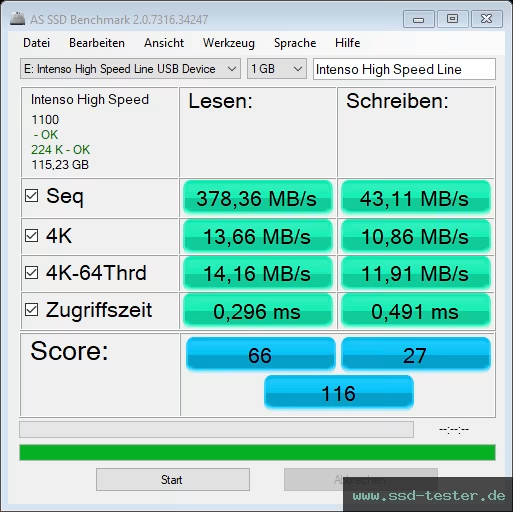
…which is actually pretty good in 4K workloads (don’t care much about sequential writes, 40MB/s is fine), so I ordered one.
Unsurprisingly, it looks exactly like advertised.

Small form factor, yellow styling elements on black body, a protective cap that isn’t held by anything and will get lost in no time, plus some reddish activity LED once the thing is in operation. Standard four-dimensional USB-A plug with blue marking that needs to be rotated three times before it fits the port.

Surprising, however, are the test results. These are from my laptop at work, hence the AS SSD test under Windows 11:

That is a TOTALLY different thing to the one tested by SSD Tester. Half the sequential read speeds, double the sequential writes. 11% of 4K read performance and 3% (THREE PERCENT) of 4K writes. Triple the read access times, 25x the write access times.
That’s fucking horrible and in the mentioned 8€ class of drives – but I think we spent like 22€.
Short conclusion, and this is your tl;dr: Intenso has changed this drive over the years (the reference test was apparently made in December of 2020, which could very well be given the device was first listed in October of 2018), and it has clearly changed for the worse. DO. NOT. BUY. IN. 2026.
Digging deeper, there’s actually quite a few things that are interesting.
For once, the drive firmware has changed from “1100” to “PMAP”. It’s rare that a version number suddenly changes to some character string instead of just incrementing the number, so this could be running on a totally different controller and maybe NAND setting. Which, coming back to Intenso’s reputation, is exactly why I avoided them like the plague, because they pulled off this shite back in the late 1990s with writeable CDs, and in the early 2000s with DVDs. Someone got a nice batch of really good disks and recommended the product – and later buyers purchased abysmal trash. Not saying it always went the good-to-bad route, sometimes they held up quality or reverted back to the good stuff, but since this is all rebadged products with minimal hard specifications, it’s been hit-and-miss for the past 25, almost 30 years. Not something that I would personally recommend.
Second, the drive does have a default partition offset of 3776K (7552 sectors of 512 bytes), compared to 224K previously. That’s 59x 128 sectors and even weirder than the 63 sector offset of Windows XP that didn’t go well with SSDs/NAND in general. I would assume this aligns with some 64K page size of the NAND used, but leaving a 4MB gap at the beginning of the drive is certainly weird. Plus, no physical layout is reported, so it is possible to format this drive with an excruciatingly stupid offset across physical sector sizes, because no operating system does actually know what to avoid. This will lead to even slower performance and high write amplification, burning through the limited NAND write cycles like there’s no tomorrow.

SMART is also not present like in higher-spec drives, so gsmartcontrol just spits out info we already know:
"output": [
      "smartctl 7.5 2025-04-30 r5714 [x86_64-linux-6.14.0-37-generic] (local build)",
      "Copyright (C) 2002-25, Bruce Allen, Christian Franke, www.smartmontools.org",
      "",
      "=== START OF INFORMATION SECTION ===",
      "Vendor:               Intenso",
      "Product:              High Speed Line",
      "Revision:             PMAP",
      "Compliance:           SPC-4",
      "User Capacity:        125,829,120,000 bytes [125 GB]",
      "Logical block size:   512 bytes",
      "scsiModePageOffset: response length too short, resp_len=4 offset=4 bd_len=0",
      "scsiModePageOffset: response length too short, resp_len=4 offset=4 bd_len=0",
      ">> Terminate command early due to bad response to IEC mode page",
      "A mandatory SMART command failed: exiting. To continue, add one or more '-T permissive' options."
    ],
…which leads us to the next issue: People on Amazon have actually complained about the storage capacity of these drives. Yes, most of them still do not understand the concept of Microsoft being a dumbass and interchanging GiB and GB, but they’re actually correct on this one: This “128GB” drive does only offer… 125.8GB, or 120000MiB, or 117.2GiB:
User Capacity: 125,829,120,000 bytes [125 GB]
Is that even legal? I’d love to dig deeper into this. Sure, everybody uses the difference between the physical 128GiB (or even a tad more?) and the typically usable 128GB or 120GB, but I have not seen a “128GB” drive offering only 125GB and keeping 17GB for caching, garbage collection and other internal duties of the controller.
Next: TRIM. This is not an SSD nor does it advertise as one, so running fstrim does fail, regardless of partition type (tested with NTFS and ext4, not that this should matter anymore with kernel 6.x):
sudo fstrim -v /run/media/bzzz/Nonsenso [NTFS]
fstrim: /run/media/bzzz/Nonsenso: the discard operation is not supported

ext4:
sudo fstrim -v /run/media/bzzz/af87f0b8-41de-4da1-89a1-39b0fa0c905a [ext4]
fstrim: /run/media/bzzz/af87f0b8-41de-4da1-89a1-39b0fa0c905a: the discard operation is not supported
This also means that garbage collection can not be forced or influenced by the user, leaving the drive in an unclear state of performance after using it, especially for non-compressible test data from benchmarks. The activity LED does not blink during internal tasks, so there’s no way to know if some internal GC is running/finished.
And this leads us to the last tests, which is performance under sustained writes. I did run h2testw once over the full drive after the initial AS SSD (1GB), which completed with 32.8MB/s sustained write and 131MB/s reads. While that is technically in spec since Intenso covers its ass with the beloved “up to” marketing claim of 100MB/s writes and 250MB/s reads, this is ⅓ of expected write and ½ of expected read performance – once again a terrible result.
Note: Those aren’t even high numbers for a “High Speed Line” drive positioned at literally THE top end of Intenso’s lineup. Kingston, for example, offers at least 24 different drives with 128GB, and their “DataTraveler SE9 G3” that currently costs exactly the same as the Intenso drive is specced at 100/220MB/s, while the top end drive claims 300/400MB/s performance figures – that is “High Speed”.
Running more of these tests later yielded these results:
5x1GB:

5x1GB with 1MiB partition alignment via gparted:

And 5x16GB afterwards. 4K writes TOTALLY collapse to single KB/s instead of 10MB/s. Total cache exhaustion and subsequent performance like the cheapest crap from Aliexpress – just much more expensive.

No single test after the initial write to the drive showed close to those 80MB/s write speeds ever again, even after hours of idling. This is directly linked to TRIM/GC, but if this never triggers, this will also never resolve. Piss-poor.
Safe to say I’m going to ask them what on earth is going on with their 125GB user capacity, and what’s wrong with their read and write speeds – and unless they have very good answers on those questions, I’m going to avoid them again like the plague for the next 20 years.
Side note: I would like to report this distinctly different result to ssd-tester.com – but aside from the generic contact for that doesn’t even allow for file attachments, I cannot find a “this is wrong” or “I have additional information” button anywhere on their page. It’s a bit like they do not want user feedback – but they have their Amazon affiliate links everywhere. A bit shady, if you ask me…


[…] update on the USB drive with less-than-advertised capacity: I have now two replies in my mailbox, one from the manufacturer Intenso, one from the local […]